Complaint. Cause. Correction.
Start with the symptom. End with the documented fix, in your customer's hands.
What this is
Enroll the customer and the asset, then record the PM or annual inspection while you are still in front of the equipment. The work gets a record number when you start it. When the work is complete you send the record to your customer — a page they can open, read and keep. When they confirm it, it is on your record.
The record
What your customer gets.
Opens from a link, no account. Shows what was checked, what passed, next inspection due.
Example record · sample data
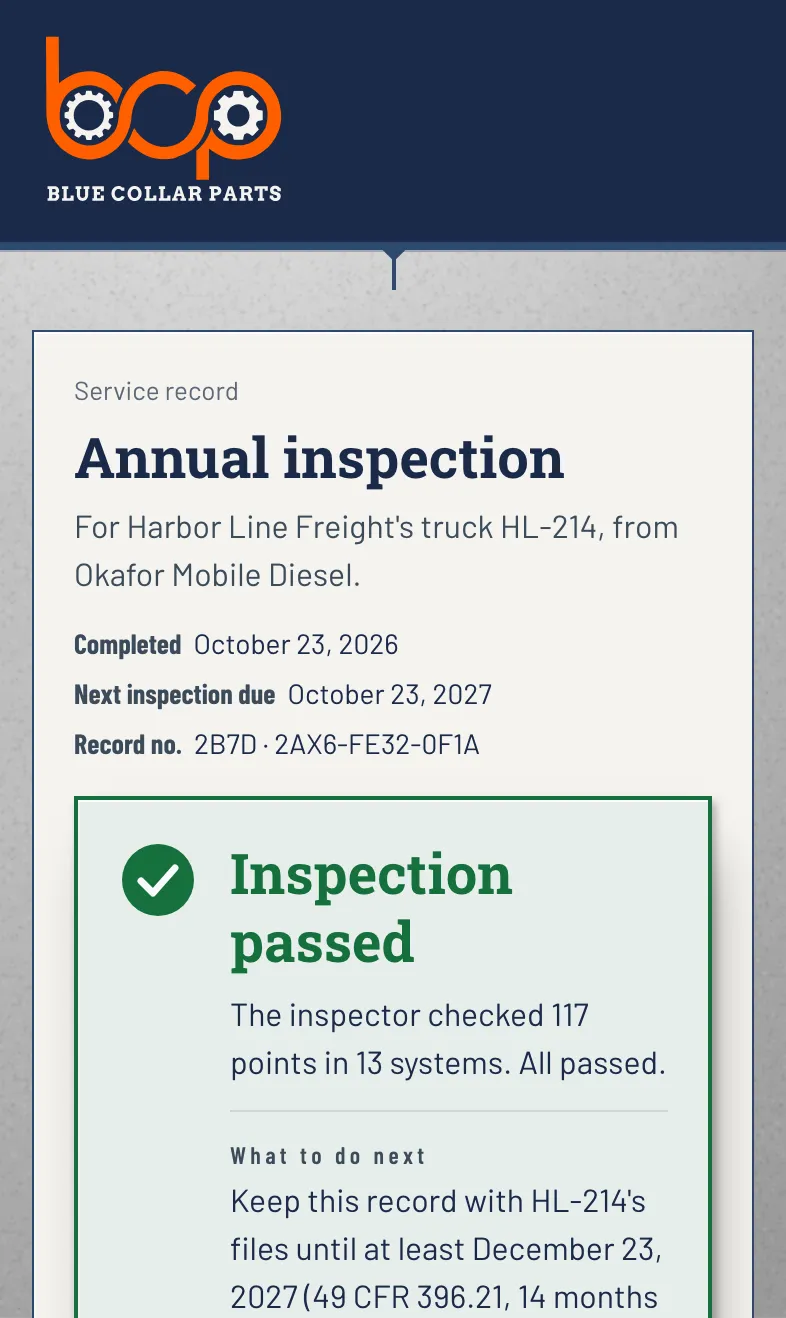
Annual inspection
For Harbor Line Freight's truck HL-214, from Coastal Diesel & Trailer.
- Completed
- Next inspection due
- October 21, 2027
- Record no.
- 2B7D · 2AX6-FE32-0F1A
Inspection passed
Coastal Diesel & Trailer
This record shows what the service provider recorded. BCP doesn't certify the unit or the person who recorded it.
Who's on this record
The unit, the customer, and the service provider who did the work.
Unit
HL-214
- Vehicle
- 2022 Peterbilt 579
- Type
- Truck
- VIN
- •••••••••••748215
Customer
Harbor Line Freight
Service provider
Coastal Diesel & Trailer
- Contact
- Contact details not on file
Recorded by
Luis Reyes
- Date performed
- October 21, 2026
- Qualification
- Federal- or State-sponsored inspector training (49 CFR 396.19(a)(3)(i))
As stated by the person who recorded it. BCP doesn't verify qualifications.
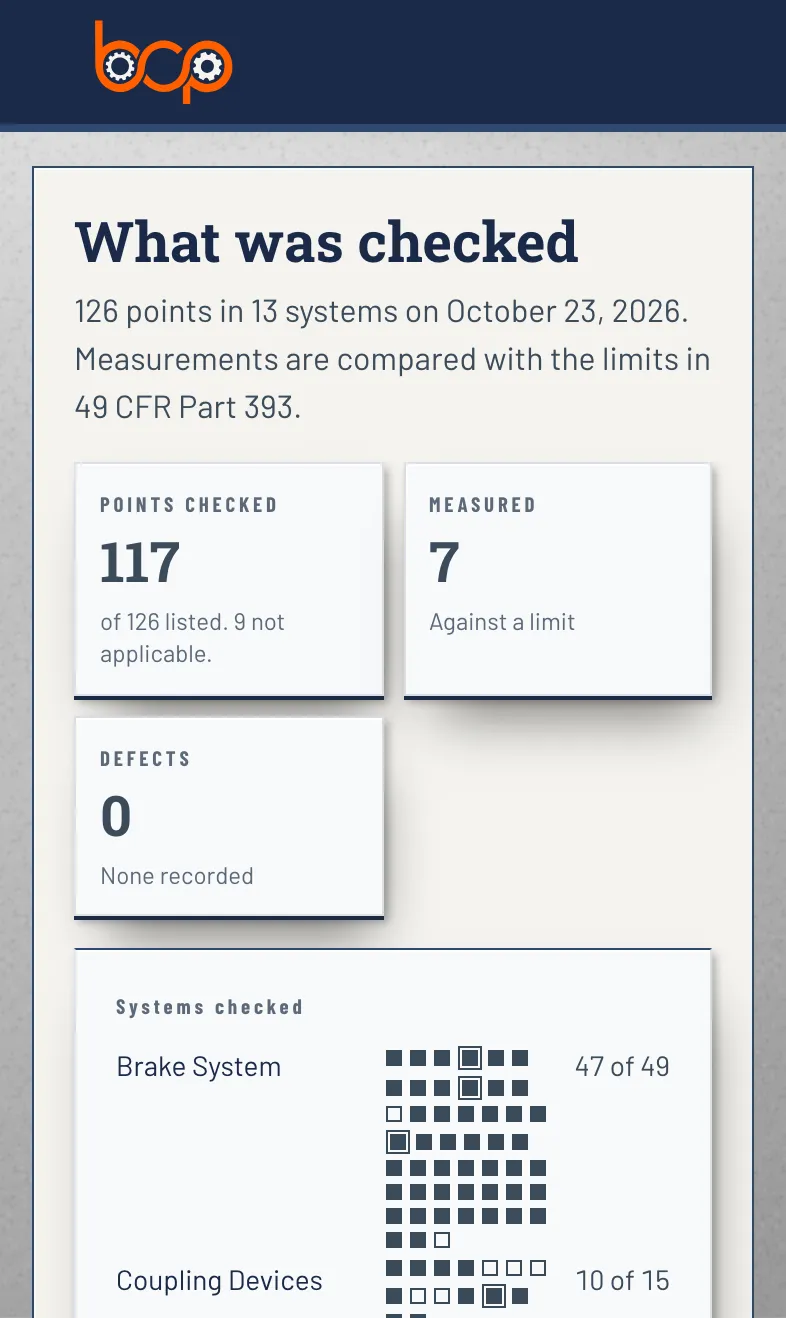
What was checked
126 points in 13 systems on October 21, 2026.
Systems checked
- Brake System: 40 of 49 points checked, 0 defects, 9 not applicable
- Coupling Devices: 15 of 15 points checked, 0 defects
- Exhaust System: 4 of 4 points checked, 0 defects
- Fuel System: 3 of 3 points checked, 0 defects
- Lighting Devices: 1 of 1 point checked, 0 defects
- Safe Loading: 3 of 3 points checked, 0 defects
- Steering Mechanism: 16 of 16 points checked, 0 defects
- Suspension: 3 of 3 points checked, 0 defects
- Frame: 3 of 3 points checked, 0 defects
- Tires: 23 of 23 points checked, 0 defects
- Wheels and Rims: 4 of 4 points checked, 0 defects
- Windshield Glazing: 1 of 1 point checked, 0 defects
- Windshield Wipers: 1 of 1 point checked, 0 defects
- Checked
- Measured
- Not applicable
- Defect
Motorcoach Seats and Rear Impact Guard don't apply to this unit.
Every point checked
Brake System, 40 checked
- Absence of braking action on any axle required to have brakes upon application of the service brakes (e.g., missing brakes, or brake shoes failing to move on a wedge, S-cam, cam, or disc brake)Passed
- Missing or broken mechanical components: shoes, lining, pads, springs, anchor pins, spiders, cam rollers, push-rods, air chamber mounting boltsPassed
- Loose brake components including air chambers, spiders, and cam shaft support bracketsPassed
- Audible air leak at brake chamber (e.g., ruptured diaphragm, loose chamber clamp)Passed
- Pushrod stroke exceeding the readjustment limitPassed
- Brake lining or pad not firmly attached to the shoe, saturated with oil/grease/brake fluid, or below thickness minimumPassed
- Missing brake on any axle required to have brakesPassed
- Mismatch across any power unit steering axle of air chamber sizes or slack adjuster lengthPassed
- Wedge brake: movement of the scribe mark on the lining exceeds 1/16 in.Passed
- No brakes on the vehicle or combination are applied upon actuation of the parking brake control, including driveline hand-controlled parking brakesPassed
- Any external crack that opens upon brake application (short hairline heat-check cracks are not flexural cracks)Passed
- Any portion of the drum or rotor missing or in danger of falling awayPassed
- Damage extending through the outer reinforcement ply (rubber-impregnated fabric cover is not a reinforcement ply; on thermoplastic nylon, exposure of a second color is cause for rejection)Passed
- Bulge or swelling when air pressure is appliedPassed
- Any audible leaksPassed
- Two hoses improperly joined (e.g., spliced over tubing and clamped)Passed
- Air hose cracked, broken, or crimpedPassed
- Any audible leakPassed
- Tubing cracked, damaged by heat, broken, or crimpedPassed
- Missing, inoperative, or does not operate at 55 psi and below, or 1/2 the governor cut-out pressure, whichever is lessPassed
- Inoperable or missing tractor protection valve(s) on power unitPassed
- Compressor drive belts in condition of impending or probable failurePassed
- Loose compressor mounting boltsPassed
- Cracked, broken, or loose pulleyPassed
- Cracked or broken mounting brackets, braces, or adaptersPassed
- Absence of braking action on any wheel required to have brakesPassed
- Missing or inoperable breakaway braking devicePassed
- Insufficient vacuum reserve to permit one full brake application after engine is shut offPassed
- Vacuum hose(s) or line(s) restricted, abraded through outer cover to cord ply, crimped, cracked, broken, or collapsing when vacuum is appliedPassed
- Lacks an operative low-vacuum warning device as requiredPassed
- Missing ABS malfunction indicator components (bulb, wiring, etc.)Passed
- ABS malfunction indicator does not illuminate when power is first applied to the ABS controller (ECU) during initial power upPassed
- ABS malfunction indicator stays illuminated while power is continuously applied to the ABS controller (ECU)Passed
- ABS malfunction indicator lamp on a trailer or dolly does not cycle when electrical power is applied only to the constant ABS power circuit, or only to the stop lamp circuitPassed
- With brakes released and ignition in normal run position, power unit does not provide continuous electrical power to the ABS on any air-braked vehicle it is equipped to towPassed
- Other missing or inoperative ABS componentsPassed
- Failure to maintain a brake within the brake stroke limit specified by the vehicle manufacturerPassed
- Any automatic brake adjuster replaced with a manual adjusterPassed
- Damaged, loose, or missing componentsPassed
- Any brake out of adjustment on initial inspection must be evaluated to determine why the automatic adjuster is not functioning, and the underlying problem corrected before the vehicle can pass. Manually adjusting an automatic adjuster without first correcting the underlying problem is not acceptable.Passed
Coupling Devices, 15 checked
- Mounting to frame: any fasteners missing or ineffective; any movement between mounting components; any mounting angle iron cracked or brokenPassed
- Mounting plates and pivot brackets: any fasteners missing or ineffective; any welds or parent metal cracked; more than 3/8 in. horizontal movement between pivot bracket pin and bracket; pivot bracket pin missing or not securedPassed
- Sliders: any latching fasteners missing or ineffective; any fore or aft stop missing or not securely attached; movement more than 3/8 in. between slider bracket and slider base; any slider component cracked in parent metal or weldPassed
- Lower coupler: horizontal movement between upper and lower halves exceeds 1/2 in.; operating handle not in closed or locked position; kingpin not properly engaged; separation allowing light to show through side to side; cracks in the fifth wheel plate (except cracks in approach ramps and casting shrinkage cracks in the ribs of a cast fifth wheel body); locking mechanism parts missing, broken, or deformed such that the kingpin is not securely heldPassed
- Mounting to frame: any missing or ineffective fasteners (a fastener is not missing if there is an empty hole in the device but no corresponding hole in the frame, or vice versa); mounting surface cracks extending from point of attachment; loose mounting; frame cross member providing attachment crackedPassed
- Integrity: cracks anywhere in the pintle hook assembly; any welded repairs to the pintle hook; any part of the horn section reduced by more than 20%; latch insecurePassed
- Mounting: any cracks in attachment welds; any missing or ineffective fastenersPassed
- Integrity: any cracks; any part of the eye reduced by more than 20%Passed
- Slider (power or manual): ineffective latching mechanism; missing or ineffective stop; movement of more than 1/4 in. between slider and housing; any leaking air or hydraulic cylinders, hoses, or chambers (other than slight oil weeping normal with hydraulic seals)Passed
- Integrity: any cracks; movement of 1/4 in. between subframe and drawbar at point of attachmentPassed
- Safety devices missingPassed
- Unattached or incapable of secure attachmentPassed
- Chains and hooks: worn to the extent of a measurable reduction in link cross section; improper repairs including welding, wire, small bolts, rope, and tapePassed
- Cable: kinked or broken cable strands; improper clamps or clampingPassed
- Method of attachment: any missing or ineffective fasteners; loose mountings; any cracks or breaks in a stress or load bearing member; horizontal movement between upper and lower saddle-mount halves exceeds 1/4 in.Passed
Exhaust System, 4 checked
- Any exhaust system determined to be leaking at a point forward of or directly below the driver/sleeper compartmentPassed
- Bus, gasoline powered: exhaust leaking or discharging in excess of 6 in. forward of the rearmost part of the busPassed
- Bus, other than gasoline powered: exhaust leaking or discharging in excess of 15 in. forward of the rearmost part of the bus, or forward of a door or window designed to be opened (exception: emergency exits)Passed
- Any part of the exhaust system located so as to likely result in burning, charring, or damaging the electrical wiring, the fuel supply, or any combustible part of the vehiclePassed
Fuel System, 3 checked
- A fuel system with a visible leak at any pointPassed
- A fuel tank filler cap missingPassed
- A fuel tank not securely attached by reason of loose, broken, or missing mounting bolts or brackets (some fuel tanks use springs or rubber bushings to permit movement)Passed
Lighting Devices, 1 checked
- All lighting devices and reflectors required by 49 CFR Part 393 must be operablePassed
Safe Loading, 3 checked
- Part(s) of vehicle or condition of loading such that the spare tire or any part of the load or dunnage can fall onto the roadwayPassed
- Protection against shifting cargo: any vehicle without a front-end structure or equivalent device as requiredPassed
- Container securement devices on intermodal equipment: any device used to secure an intermodal container to a chassis — including rails or support frames, tiedown bolsters, locking pins, clevises, clamps, and hooks — that is cracked, broken, loose, or missingPassed
Steering Mechanism, 16 checked
- Free play exceeding the limit for the wheel diameter and steering type. On power steering vehicles the engine must be running.Passed
- Any absence or looseness of U-bolt(s) or positioning part(s)Passed
- Worn, faulty, or obviously repair-welded universal joint(s)Passed
- Steering wheel not properly securedPassed
- Any crack(s)Passed
- Any obvious welded repair(s)Passed
- Any mounting bolt(s) loose or missingPassed
- Any crack(s) in gear box or mounting bracketsPassed
- Any looseness of the pitman arm on the steering gear output shaftPassed
- Auxiliary power assist cylinder loosePassed
- Any movement under steering load of a stud nutPassed
- Any motion, other than rotational, between any linkage member and its attachment point of more than 1/4 in.Passed
- Loose clamp(s) or clamp bolt(s) on tie rods or drag linksPassed
- Any looseness in any threaded jointPassed
- Nut(s) loose or missing on tie rods, pitman arm, drag link, steering arm, or tie rod armPassed
- Any modification or other condition that interferes with free movement of any steering componentPassed
Suspension, 3 checked
- Any U-bolt(s), spring hanger(s), or other axle positioning part(s) cracked, broken, loose, or missing resulting in shifting of an axle from its normal position (after a turn, lateral axle displacement is normal with some suspensions; straight-line operation returns the axle to alignment)Passed
- Spring assembly: any leaves in a leaf spring assembly broken or missing; any broken main leaf (includes assemblies with more than one main spring); coil spring broken; rubber spring missing; one or more leaves displaced such that they could contact a tire, rim, brake drum, or frame; broken torsion bar spring in a torsion bar suspension; deflated air suspension (system failure, leak, etc.)Passed
- Torque, radius, or tracking components: any part of the assembly, or any part attaching it to the frame or axle, that is cracked, loose, broken, or missing (does not apply to loose bushings in torque or track rods)Passed
Frame, 3 checked
- Frame members: any cracked, broken, loose, or sagging frame member; any loose or missing fasteners, including fasteners attaching functional components such as engine, transmission, steering gear, suspension, body parts, and fifth wheelPassed
- Tire and wheel clearance: any condition, including loading, that causes the body or frame to contact a tire or any part of the wheel assembliesPassed
- Adjustable axle assemblies (sliding subframes): locking pins missing or not engagedPassed
Tires, 23 checked
- Less than 4/32 in. tread when measured at any point on a major tread groovePassed
- Body ply or belt material exposed through the tread or sidewallPassed
- Any tread or sidewall separationPassed
- A cut where the ply or belt material is exposedPassed
- Labeled 'Not for Highway Use' or other marking excluding use on a steering axlePassed
- A tube-type radial tire without radial tube stem markings (red band around the stem, 'radial' embossed in metal stems, or 'radial' molded in rubber stems)Passed
- Mixing bias and radial tires on the same axlePassed
- Tire flap protrudes through valve slot in rim and touches stemPassed
- Regrooved tire, except motor vehicles used solely in urban or suburban service (see exception in 49 CFR 393.75(e))Passed
- Boot, blowout patch, or other ply repairPassed
- Weight carried exceeds tire load limit, including overload resulting from low air pressurePassed
- Tire is flat or has a noticeable (audible or felt) leakPassed
- Any bus equipped with recapped or retreaded tire(s)Passed
- So mounted or inflated that it contacts any part of the vehiclePassed
- Weight carried exceeds tire load limit, including overload resulting from low air pressurePassed
- Tire is flat or has a noticeable (audible or felt) leakPassed
- Body ply or belt material exposed through the tread or sidewallPassed
- Any tread or sidewall separationPassed
- A cut where ply or belt material is exposedPassed
- So mounted or inflated that it contacts any part of the vehicle, including contact with its matePassed
- Marked 'Not for highway use' or otherwise marked with like meaningPassed
- Less than 2/32 in. tread when measured at any point on a major tread groovePassed
- Installation of speed-restricted tires unless specifically designated by the motor carrierPassed
Wheels and Rims, 4 checked
- Lock or side ring: bent, broken, cracked, improperly seated, sprung, or mismatched ring(s)Passed
- Wheels and rims: cracked or broken, or has elongated bolt holesPassed
- Fasteners (both spoke and disc wheels): any loose, missing, broken, cracked, stripped, or otherwise ineffective fastenersPassed
- Welds: any cracks in welds attaching disc wheel disc to rim; any crack in welds attaching tubeless demountable rim to adapter; any welded repair on aluminum wheel(s) on a steering axle; any welded repair other than disc-to-rim attachment on steel disc wheel(s) mounted on the steering axlePassed
Windshield Glazing, 1 checked
- Any crack, discoloration, or vision-reducing matter outside the excluded border areas, except factory tinting, narrow non-intersecting cracks, small isolated damaged areas, and labels/stickersPassed
Windshield Wipers, 1 checked
- Any power unit that has an inoperative wiper, or missing or damaged parts that render it ineffectivePassed
Scheduled or not
Your schedule.
The visit sits on your calendar.
Example record · sample data
Forecasted schedule
Next service dates from completed service events, alongside the work already on the books.
- Due
- due Next service due
- PM
- PM Service event
OCTOBER 2026
| SUN | MON | TUE | WED | THU | FRI | SAT |
|---|---|---|---|---|---|---|
27 | 28 | 29 | 30 | 1 | 2 | 3 |
4 | 5 | 6 | 7 | 8 | 9 | 10 |
11 | 12 | 13 | 14 | 15 | 16 | 17 |
18 | 19 | 20 | 21 today
| 22 | 23 | 24 |
25 | 26 | 27 | 28 | 29 | 30 | 31 |
UPCOMING NEXT SERVICE
No upcoming services in the next 30 days.
Scheduled or not
Your customers.
Add the customer once, with their contact and the equipment you service.
Example record · sample data
Harbor Line Freight
- Contact
- Alex Moreno
- dispatch@harborline.example
- Phone
- (555) 010-2210
- USDOT
- Not recorded
ASSETS
1SERVICE EVENTS
4- SERVICED
- SERVICED
- SERVICED
- SERVICED
Next visit
Add this visit to your calendar.
Start the visit
Start from a VIN.
The VIN fills in the unit's year, make and model.
Example record · sample data
HL-214 · 2022 Peterbilt 579
- Customer
- Harbor Line Freight
- VIN
- 1XPBD49X7ND748215
- Equipment
- Truck
- Next service
- Oct 21, 2027 · in 365 days
SERVICE EVENTS
4- SERVICED
- SERVICED
- SERVICED
- SERVICED
Next visit
Add this visit to your calendar.
The walk
Walk it, record it, finish it.
Record what you found, finish the service, set the next service date and send it.
Example record · sample data
- Customer
- Harbor Line Freightdispatch@harborline.example
- Vehicle
- HL-2142022 Peterbilt 579
- Status
- In the shop
Record what you found
Complete a preventive-maintenance record before completing this service event.
Send
Build your record.
Starting is free; you pay when you send the record. The customer gets the record.
Example record · sample data
- Customer
- Harbor Line Freightdispatch@harborline.example
- Vehicle
- HL-2142022 Peterbilt 579
- Status
- Ready to send
Next service date
Saved: due 10/21/2027
Send to customer
$15.00Harbor Line Freight gets an email with this record: what you inspected, what you found, and the next service date. They do not need an account to open it.
- You pay
- $15.00
- Suggested on your invoice
- $35.00
- You keep
- $20.00
Put the record on your own invoice. BCP never bills your customer.
Service record
- Service record — ServicedCompleted 10/21/2026
- Customer
- Harbor Line Freightdispatch@harborline.example
- Vehicle
- HL-2142022 Peterbilt 579
- Status
- Sent
Next service date
Saved: due 10/21/2027
Service record
- Service record — ServicedCompleted 10/21/2026
Send
Your console moves on.
It keeps the next service date.
Free to start. Pay when you send: $15.00 per record sent.
Example record · sample data
Maintenance status
Service dates carried forward from completed service events.
Maintenance status
Service dates carried forward from completed service events.
What the customer receives
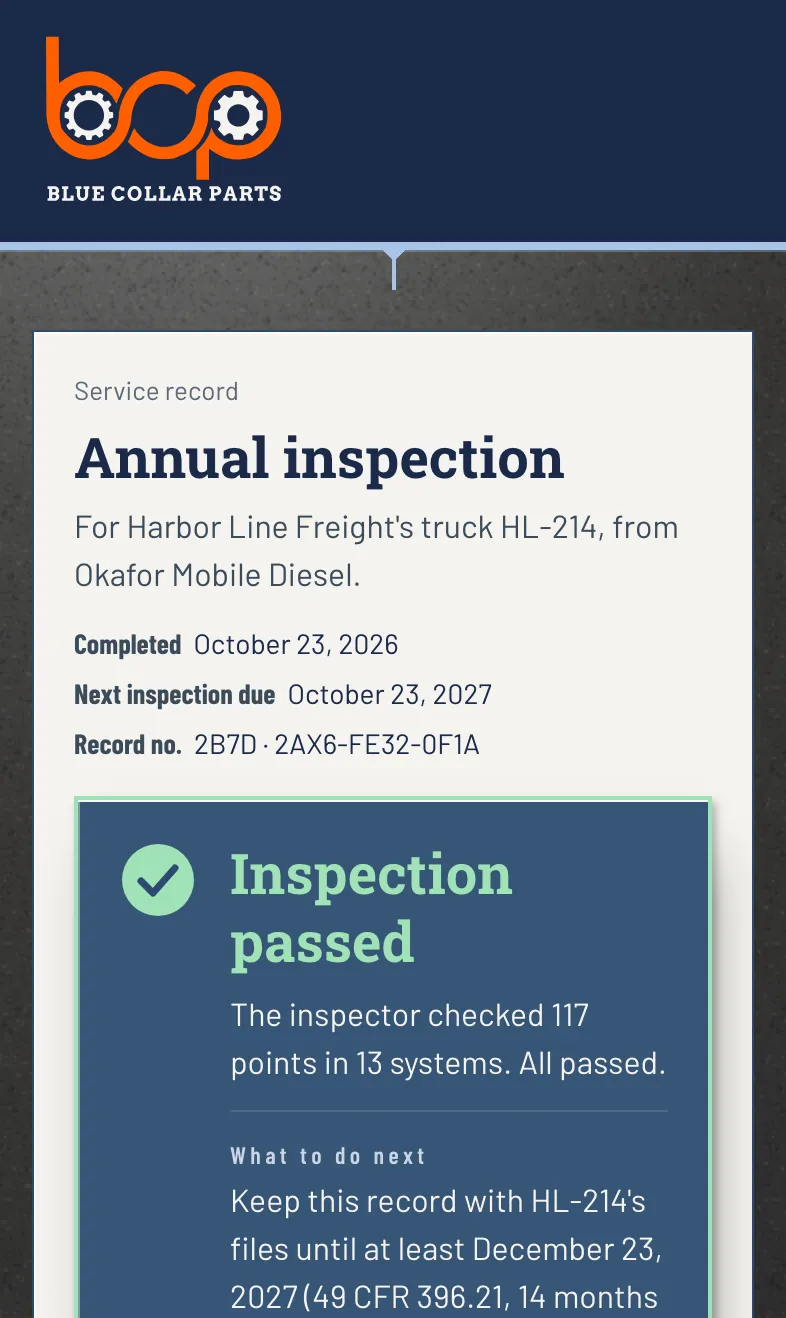
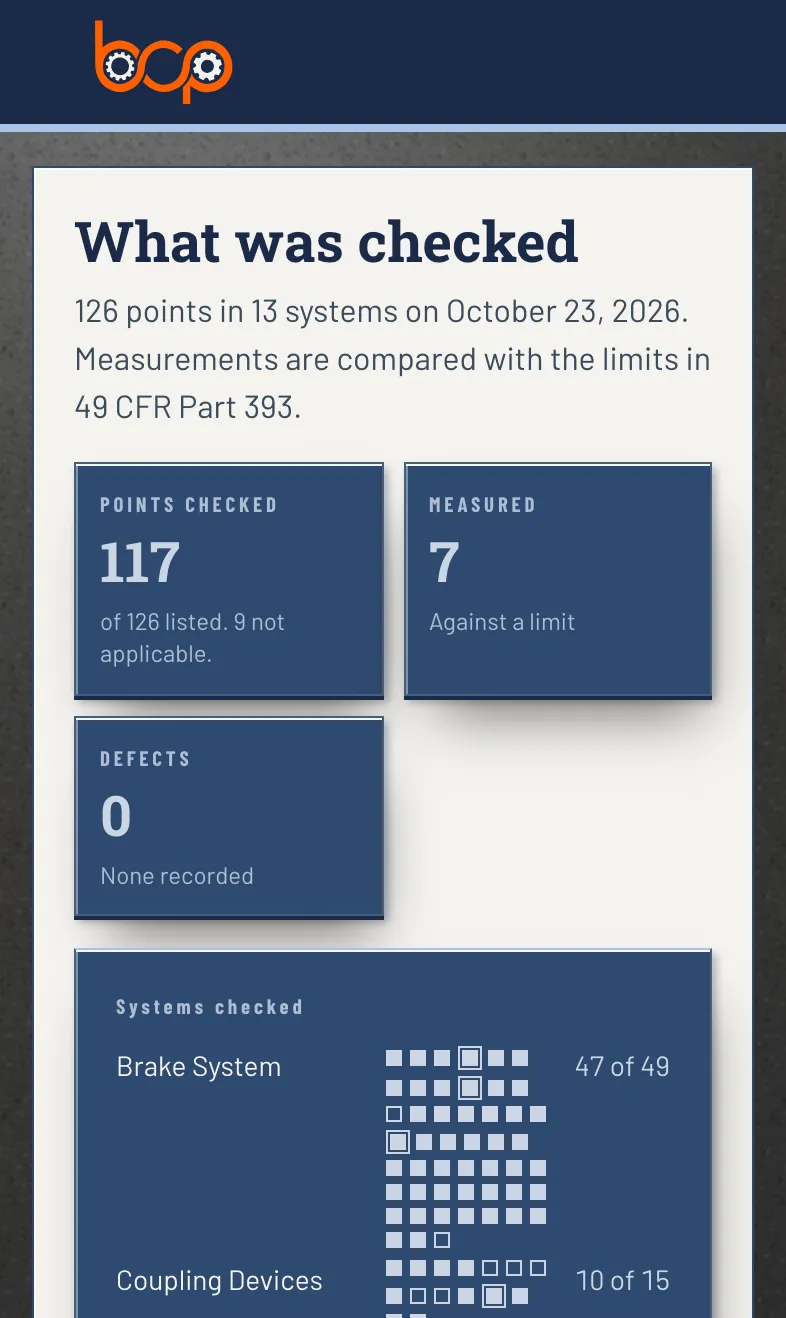
A record page naming the asset it covers, the date, the technician who did the work, and the service event it belongs to — with the condition report beside it: every item you recorded, the measurement where you took one, and the limit it was read against.
Example record · sample data
Example record · sample data
What it costs
Enrolling a customer is free. Recording the work is free. You pay once, when you send the record to your customer.
- You pay
- $15.00
- Suggested on your invoice
- $35.00
- You keep
- $20.00
US dollars, per record sent (a “publication” in the Terms of Service), whatever service schedule you choose. Put the record on your own invoice. BCP never bills your customer. Checkout reads the same catalog these figures come from (version 3), so the price you pay here is the price it charges.
What Blue Collar Parts does not do
Blue Collar Parts does not verify or certify technicians. Qualification to perform an annual inspection is yours and your employer’s to establish and document under 49 CFR 396.19 and 49 CFR 396.25. Blue Collar Parts records what you enter and sends it in your name. It does not vouch for it, and using it does not make an operator compliant.
Informational only, and not legal or regulatory advice. This is not the operative regulatory text, regulations are amended, and State requirements vary. Consult the current 49 CFR Part 396 and guidance specific to your situation.